ORBIT: How to Make an Muse AI Short Film
Prompt 1, analyze a successful story: Analyze this video and tell me what the core story behind it is: [YouTube video link]. Give me a summary with the most important details, the plot and who the main character is.

Prompt 2, generate ideas: Generate ideas using a similar approach, ideas that can stand out on YouTube.

Prompt 3, build the characters: I want to generate the idea titled [idea title] as a video of [length], keeping the character and scene consistency intact. First give me the character sheet for all the main characters in this story.

Prompt 4, create the storyboard: I need a visual storyboard that represents the whole story, based on the characters and scenes you created. Give me one image from each scene, all in the same sheet.

Prompt 5, write the script: Give me a frame-by-frame script with a detailed description of each scene.

Prompt 6, generate the opening shot: Generate the first shot, the opening title, with visual animation and sound details.

Prompt 7, generate the clips: Generate shot [number], with synchronized audio and a detailed description of the prompt used. Repeat it shot by shot.

Prompt 8, fix a shot: Change [what you do not like] in shot [number].
The how
- Reference
- VID-0010
- Model
- Muse AI
- Duration
- 2 min 49 s
- Aspect ratio
- 16:9
- Dimensions
- 1920 x 1080
- Resolution
- 1080p
- Frame rate
- 30 fps
- Camera motion
- Each scene in this Muse AI short film has a predefined camera movement. You can change it in the chat description with Muse AI.
- Style
- Cinematic, Drama, Photorealistic, Sci-fi
- File format
- MP4
- Steps
- 1. On YouTube, filter the search by the last 30 days, videos between 3 and 20 minutes, and sort by popularity.
2. Look for videos with many views but few channel subscribers, a sign that YouTube is promoting them.
3. Choose one video; here, one with almost 1 million views and only 20,000 subscribers.
4. Ask Muse AI to analyze it and tell you the core story, the plot and the main character.
5. Ask Muse AI for ideas that follow a similar approach, and choose one of the five it gives you; here, ORBIT.
6. Ask for the character sheet of all the main characters, then for a visual storyboard with one image per scene.
7. Ask for a frame-by-frame script; here, it returned 23 clips grouped into six chapters.
8. Generate the opening title shot first, then every shot one by one, asking Muse AI to change any clip you do not like.
9. Merge all the clips in a video editor such as CapCut, then export and share the short film. - Expected result
- A short film of under three minutes, built from 23 AI clips with synchronized audio, that tells a complete emotional story based on a pattern already proven on YouTube.
- Tips
- Adjust the YouTube filters, the date range or the length, to find different story patterns.
Look for many views with few subscribers, because it shows the story is standing out on its own.
Ask for the character sheet before anything else, so the characters stay consistent in every clip.
Generate the clips one by one to review each, instead of asking for the whole sequence at once.
Ask Muse AI to change any clip you do not like, and it answers with an updated version.
The free version of Muse AI was enough to make this film. - Common mistakes
- Copying the original story instead of its pattern, which makes the film feel like a duplicate.
Choosing the first idea without comparing all five.
Skipping the character sheet, which breaks consistency from clip to clip.
Generating every shot at once and finding the problems only at the end.
Picking a story because of its topic and not because of the structure behind its views. - Use case
- Short film, Storytelling, YouTube story ideas
About this prompt
Table of Contents
- Start from a story that already works
- Why the characters come before the shots
- One chapter at a time
- Make your own Muse AI short film
- Related Content
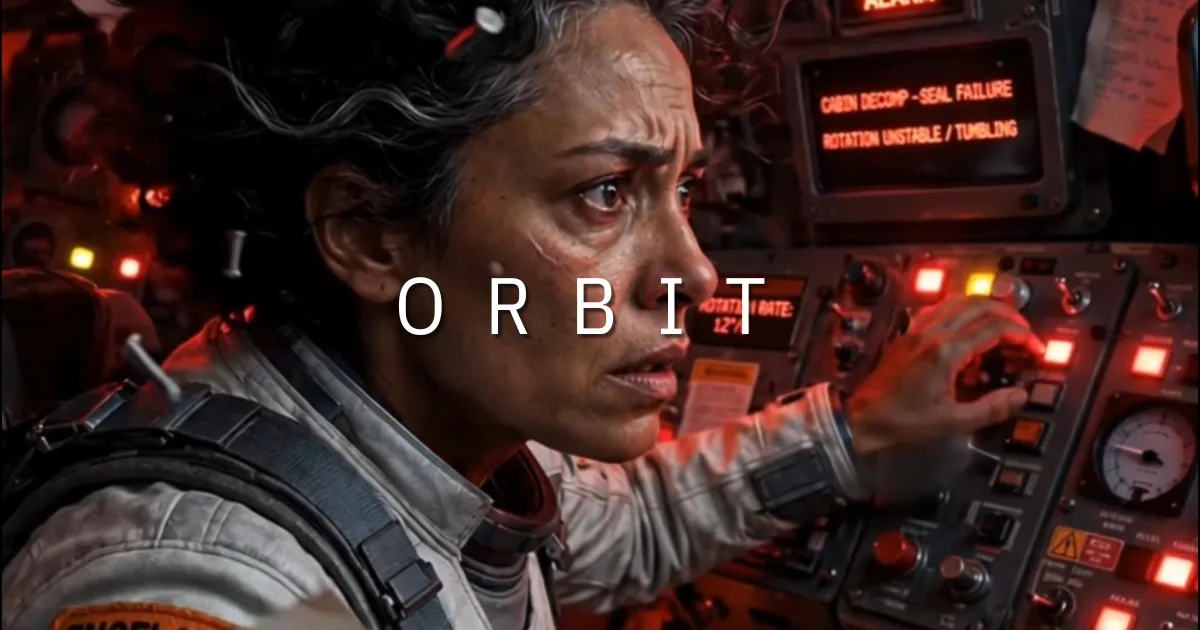
This Muse AI short film started with one question: which stories already hold an audience? ORBIT is a science fiction short of 2 minutes and 49 seconds about an astronaut who leaves for a mission of a few hours and returns sixty years later. Muse AI built the characters, the storyboard and all 23 clips from a few instructions, and CapCut joined them into the final film.
Start from a story that already works
The idea did not come from a blank page. On YouTube, the search was filtered by the last 30 days, videos between 3 and 20 minutes, and sorted by popularity, looking for a video with many views and few subscribers. That combination means the story itself is doing the work. The one chosen had almost one million views on a channel of about 20,000 subscribers, and Muse AI summarized its core story, so the new ideas could follow the same pattern.
Why the characters come before the shots
Before generating a single clip, Muse AI produced a character sheet with the astronaut, her daughter, her mother and the Navy officer, and a storyboard with one image per scene. Those two documents are what keep every face and every setting consistent across the 23 clips, a common weak point in AI short films.
One chapter at a time
The frame-by-frame script grouped the 23 clips into six chapters: The Last Mission, The Bolt, The Math, Blink for Blink, The Ocean of Time and 60 Years. Each clip comes with synchronized audio and its own written prompt, so you can change one scene without touching the rest. Generating the shots one by one lets you judge each result before moving on.
Make your own Muse AI short film
Keep the same order: story first, then characters, then storyboard, then script, then clips. The film is only as strong as its first idea, so spend your time choosing the story. For the full walkthrough, watch the tutorial on YouTube.
Related Content
- Leviathan Lagoon: Seedance 2.5 jellyfish prompt for a 30-Second One-Take Video
- Hallelujah
- 7 cinematic camera shots for AI video